What Ripple Effect is
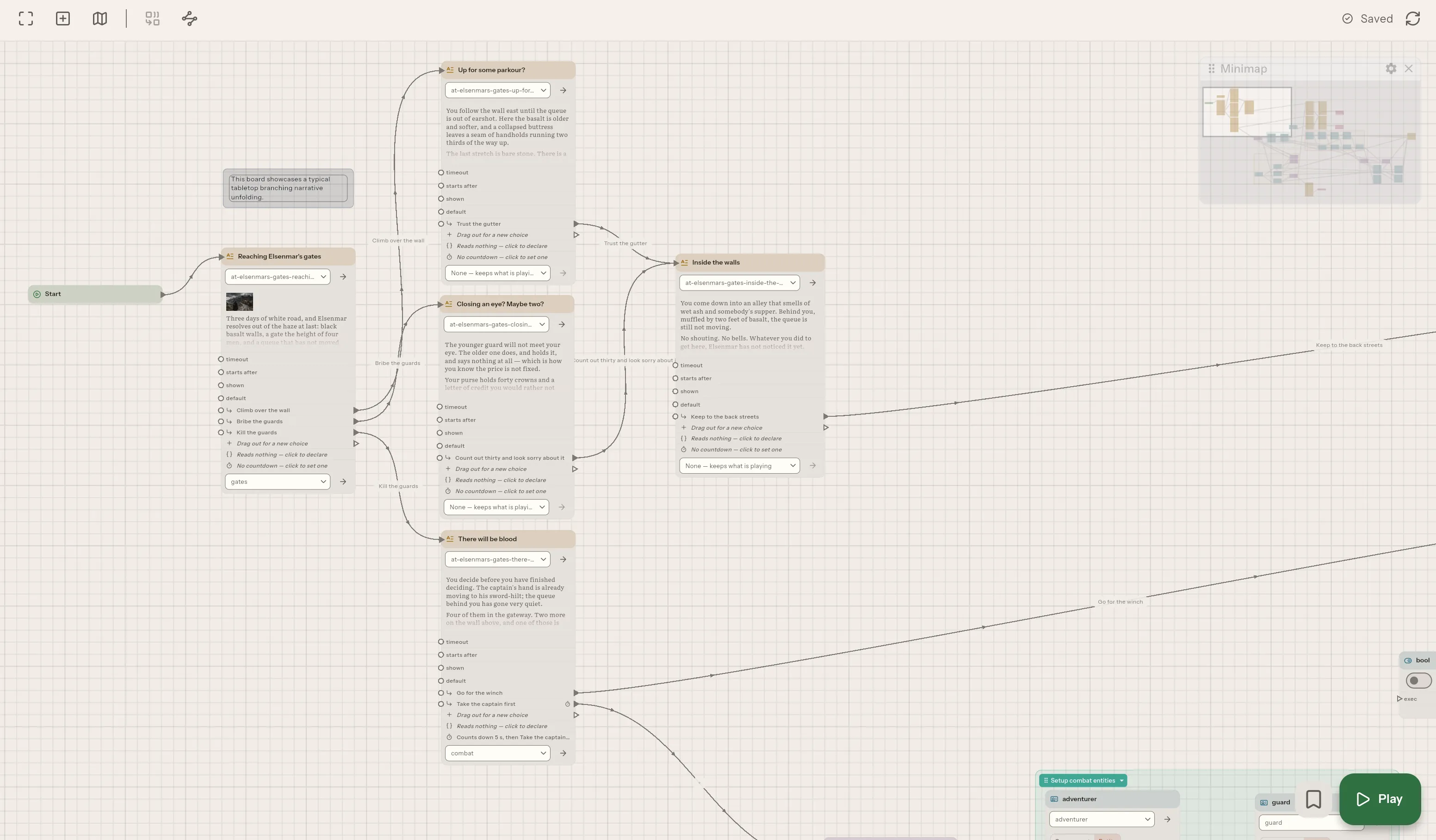
Ripple Effect is a desktop application for writing interactive stories as graphs. You lay passages out on a canvas, wire each choice to what it leads to, and press play to walk the result. It is aimed at tabletop prep, game design documents, quest and dialogue trees, and anything else where the interesting part of a document is the paths through it.
Branching, and then computing
Section titled “Branching, and then computing”Boards, connections and components live in a native app over a folder on your own disk. The shapes are plain on purpose: a story that branches is easiest to hold in your head when it looks like what it is, a set of places and the ways between them.
Branching alone is not enough for a story that has to remember things, so a visual scripting layer sits around those shapes: loops, conditions, arithmetic, dice, state machines and Python. The point of the layer is that a story can compute as well as branch. A passage can say the goblin has 3 hit points left without forking into a passage per hit-point count, because the number is kept in a console variable or a component, not in the shape of the graph.
The parts, and what each is for
Section titled “The parts, and what each is for”A board is one thread of story: a chapter, a conversation, an encounter, drawn as cards and the wires between them. A passage is a card and a choice is a wire. There are two ways to join boards together: a Jump hands the story to another board, and a macro is a stretch of story written once and called from anywhere. Boards, nodes and macros explains where those two differ.
Every passage is one file per language, so writing in more than one language is part of the shape of a project rather than an add-on, and the app tells you which translations have fallen behind. The reasoning is in Passages and translations.
A story also needs things to remember, and the app gives three different homes for them because they are different kinds of fact. Components are the characters, items and places. Console variables are the numbers and flags. State machines are the shapes: a door that is locked, then open. A board reads and changes all three; see Components and entities, Console variables and State machines.
Computation can sit in a node on the board, or inside a sentence. Python in a story covers why both exist. A passage names a soundscape, which is music and sound on a timeline in a file of its own, and it stays in force until another replaces it, while a node or a script plays a sound once and the story carries on. See Soundscapes and one-shot sounds.
A story can also read the world outside it. It can read the date and time and, if you allow it, roughly where the computer is, from Python or from the cards in the World group of the Create menu, and a stand-in under Settings → Permissions answers when it cannot have the real one; The world outside the story lists what it can ask. Words outside a passage can be in the reader’s language as well: a Localized string card holds a piece of text per language, Get locale says which language and region the reader has, and Convert turns 12 km into the units the reader’s region measures in; see How to add, switch off or change a project’s languages. An Input card asks the reader for something, and a field on it can be optional or offer fixed answers to pick from.
Playing and shipping use the same engine
Section titled “Playing and shipping use the same engine”The play button runs the story from any node, with a trace beside it saying what the story did. A passage can put a countdown on its choices and take one by itself if the reader waits too long; see How to put a countdown on a choice. It uses the same engine that an exported campaign runs, which is why a playthrough in the editor is evidence about the shipped story rather than an approximation of it; Why the preview is the shipped story gives the argument.
Export then compiles the project into a campaign that a runtime plays with no editor near it, or copies the project for a translator. These are different things with different purposes, set out in What an export is. A game that embeds the story can be told what happens in it through named host callbacks, described in Host callbacks.
Help with the writing
Section titled “Help with the writing”Passages in English and Markdown notes are checked for spelling, grammar and style as you write, on your own machine, with a dictionary per project that is shared with everyone who opens it and style rules of your own written in Weir. See How to check spelling and grammar and How to write a style rule. Dictation types what you say at the cursor, heard on your computer by a model you download once; see How to dictate a passage or a note.
Finding your way around a large story
Section titled “Finding your way around a large story”A story of any size becomes hard to hold. A Search section finds, and replaces, a word or a pattern across the whole project, in what you wrote rather than in the JSON underneath. Script navigation and route tracing show how boards hand the story to each other. Reading a large story back explains what each view is for.
Git is built in, so you can see what changed, side by side, and a conflict is shown rather than decided for you. History, sharing and conflicts covers how history, sharing and conflicts work.
The app is also an MCP server, so Claude Code, Cursor and the rest can read the project, play it and, once you allow it, write into it. What an assistant may do, and how to work with one, is covered in Working with an AI assistant.
Why a project is a folder
Section titled “Why a project is a folder”Underneath all of it, a project is a folder of ordinary files (Markdown, JSON, .py) that opens without the app. That choice is what makes the version control honest, since git sees exactly what you wrote, and it is what lets any other tool read it. The cost is that what belongs to the project is held in those files, and in a .ripple folder beside them, rather than in a database, so the app has to keep to a format it can explain. A project is a folder goes through the consequences, and Project files and the .ripple folder says exactly what is in it.
Related
Section titled “Related”- Your first story: from an empty folder to a playable branch, step by step.
- How to install Ripple Effect: Linux, Windows and macOS, and what to do when the installer is stopped.
- The workspace window, menus and palette: how the app is laid out.
- Licensing: what is yours, what is not permitted.